Showing posts with label Software. Show all posts

Monday, September 14, 2009

Torrent search : Torrent Harvester


Torrent search program features Easily searches a multitude of sites with a single click. Returns all results in a single list. Download directly from the list, or visit the Web site source page for complete details. Complete filtering and sorting of results, on any column. Automatically allows searching and downloading on sites which require user registration, using your system's cookies. Complete downloading transparency, with an engine status screen which shows a comprehensive breakdown of exactly what pages Torrent Harvester is loading and the results from each page.

Get updates of engines directly from within Torrent Harvester. Create your own engines for your favourite sites using the in-built Engine Designer, and create your own Torrent Harvester update Web site to distribute engines you create to other users. Complete help every step of the way. 88 included engines, with more coming all the time via update.

link : http://download.cnet.com/Torrent-Harvester/3000-2196_4-10595068.html

Torrent search : Bit Che


What is Bit Che?
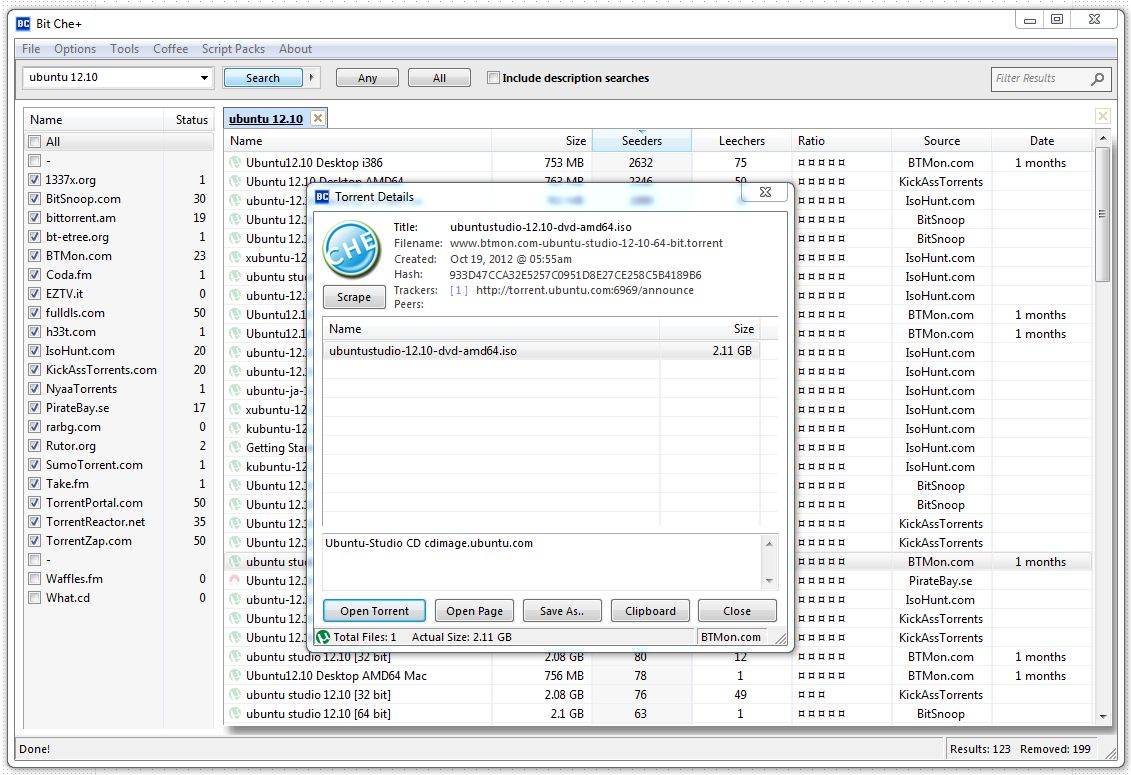
Bit Che makes searching for torrents simple. It quickly searches lots of torrent websites for files and easily organizes the results. Bit Che allows you to instantly preview the torrent details by reading the torrent file directly. Easily view the page where the torrent was found or click to open the torrent in your favorite downloader. Bit Che also features built-in filtering to remove duplicate torrents found across the different sites that it searches. Bit Che is the fastest and most efficient torrent search tool available.

Bit Che is pronouced many different ways, usually 'bit chay'. It is named after the Argentinean word 'Che' which *roughly* translates to 'Friend'. Bit Che is your Bit Torrent friend :) 


site : http://convivea.com/product.php?id=2
download : http://convivea.com/download.php?id=2

Thursday, September 10, 2009

RocketDock

What is it?
RocketDock is a smoothly animated, alpha blended application launcher. It provides a nice clean interface to drop shortcuts on for easy access and organization. With each item completely customizable there is no end to what you can add and launch from the dock.
Now with added Taskbar support your minimized windows can appear as icons on the dock. This allows for better productivity and accessibility.

Watch it in Action:


Features:
-Minimize windows to the dock
-Real-time window previews in Vista
-Running application indicators
-Simple drag-n-drop interface
-Multi-monitor support
-Supports alpha-blended PNG and ICO icons
-Icons zoom and transition smoothly
-Auto-hide and Popup on mouse over
-Positioning and layering options
-Fully customizable
-Completely Portable
-ObjectDock Docklet support
-Compatible with MobyDock, ObjectDock, RK Launcher, and Y'z Dock skins
-Runs great on slower computers
-Unicode compliant
-Supports many languages and can easily be translated
-A friendly user base :)
-And best of all... its FREE!!!

gadget : Wired/Wireless Network Meter Version 3.1


The Wired Network Meter will show you Internal IP address, External IP address, IP lookup with google maps, upload speed, download speed and total of usage.
For More Information

Last updated: 05/19/2009
File size: 92.47KB
Price: Free
Support operating system: Windows Vista

Release history
Version: 3.1 - Fixed External IP address and added auto update notification.
Version: 3.0 - Fixed Internal IP address, External IP address and added total of usage.

Download
Link 1 From Windows Live Gallery
Link 2 Download Download Now


The Wireless Network Meter will show you SSID, signal quality, Internal IP address, External IP address, IP lookup with google maps, upload speed, download speed, total of usage and whether your connection is secure or not secure. For More Information

Last updated: 05/19/2009
File size: 96.84 KB
Price: Free
Support operating system: Windows Vista

Release history
Version: 3.1 - Fixed External IP address and added auto update notification.
Version: 3.0 - Fixed Internal IP address, External IP address and added total of usage.

Download
Link 1 From Windows Live Gallery
Link 2 Download Download Now


http://addgadget.com/

gadget : All CPU Meter With Temperatures Version 1.2

With this All CPU Meter Gadget you can display your Processor usage (Quad Core, Triple Core or Dual Core), RAM usage and Processor Temperatures.
For Processor Temperatures you need to have running the Speedfan application in background for the temperature readings.

Last updated: 05/26/2009
File size: 169.47 KB
Price: Free
Support operating system: Windows Vista, Windows 7

Release history
Version: 1.2 - Added auto update notification.
Version: 1.1 - Added support for Triple Core Processor.
Download Download
Download SpeedFan Download Link 1


http://addgadget.com/all_cpu_meter_temperatures/
http://addgadget.com/

NVIDIA GPU Temp - Sidebar Gadget


Recently, it was finally over. NVIDIA has made the documentation of their driver API accessible to all. That gave me the opportunity now anative gadget without detours via N-Tune to build.
nvidia1
Since 8 September it is now also possible for normal-mortal direct access to the NVAPI get. NVIDIA has the appropriatedocumentation, lib file and header finally released for everyone.Previously this was reserved for OEM customers, or NDA.
Unfortunately, it was for me, who handled mainly with C #, not easily possible to now access the NVAPI. Since NVIDIA just a lib file, plus C + + header makes available a direct access from C # via PInvoke is not possible. It was therefore necessary to create a wrapper library in Managed C + + as this, the lib file is statically linked. Presented to me as an absolute C + +, so even lay a real challenge, it was also necessary to include this then, suitable for each platform (x86 / x64) compile to.
Because in my C + + knowledge, as already mentioned, in fact do not exist, I was unfortunately not possible to prepare them directly for access by gadgets. I have therefore decided then to another wrapper library in C # to build.
Fact that I am now but for each platform in each case had to have a library of wrapper to load the appropriate file to match the platform. A direct reference assembly is not working at this point. . NET framework using reflection, but luckily offers the possibility of so-called "Late Binding". This made it possible for me to determine, first, the platform and then load the appropriate library and made available for the parent gadget.
The result from this gadget is now required, therefore no auxiliary tools, such as N-Tune, Speedfan, etc. more and reads the temperature directly from the NVIDIA driver.
The design this time, I have held up relatively simply and only the most essential, the temperature and the types of graphic type, accommodated. The temperature bar would still accommodate the gadget very cluttered look and can thus fell victim to the cutbacks.
Update 1.1 (26.09.2008)
  • For too long card names are truncated
  • Improved access driver
  • Multi-GPU (SLI) support
Update 1.2 (04.10.2008)
  • Minor changes on behalf of reduction
  • Improved detection sensor
  • PCB temperature is shown in single GPU layout if available from the driver
  • Name is now determined via WMI
  • DumpFile Button added in the preferences window (use of support inquiries please!)
Update 1.3 (11.10.2008)
  • Font size shrinks by Name
  • Names reduction is removed (now controlled by the DIV Overflow)
  • Modified during initialization error.
  • Error DumpFile preparation appears
Update 1.4 (25.10.2008)
  • Encoding problem fixed level indication
Update 1.5 (08.03.2009)

  • Option for temperature display in degrees Fahrenheit Added

  • Option to display the current speed PCIe link added
Update 2.0 (07.08.2009)

  • Direct access to NVAPI. NET (no detour via Managed C + + DLLs that are statically linked Libs more)
Migration Note

  • 1. Close gadget

  • 2. End Sidebar

  • 3. You might also delete folders

  • c: \ Users \ [username] \ AppData \ Local \ Microsoft \ Windows Sidebar \ Gadgets \ nvidiaXX.gadget \

  • 4. New gadget install version
Downloads:
NVIDIA GPU Temp - Version 2.0 : http://download.orbmu2k.de/download.php?id=38

LINK:

Intel Core Series - Sidebar Gadget


Now, finally, with support for the Core i7 series and a few other little things ...
image
It's done, the proof of concept to give a gadget directly to the ring0 access and thus the possibility of temperatures, etc., has determined directly from the CPU proved to be successful. If you own an Intel processor, the Core series (Core Solo, Core Duo, Core 2 Duo, Core 2 Quad, Core i7 is), it is with this gadget, the temperatures at no additional programs such as Speedfan, hwmonitor, Everest etc. display.One only needs to install after installing the drivers ring0 in the preferences window.
IntelCoreSeriesGadgetScreen
Compared to the previous version, there are some improvements. This gadget now supports the new Core i7 processors from Intel. There is currently no limit on the core / thread number more. The gadget automatically and dynamically adapts to the number of available threads. Theoretically it is possible for a multi-processor system of 2 Nehalem CPU's and display the next 16 threads. Even Core Solo processors with only a single thread are now supported.
image
A little extra delicacy is available for owners of a motherboard with LPC SuperIO chip from ITE (IT87xx). These are usually found on Gigabyte motherboard. Here is also displayed in the new version, the CPU fan speed and core voltage. Whether the Board possesses that SuperIO chip can identify with the tool CPU-Z from CPUID.
image
Should not the display, despite the availability of the chip to see, so you can disable this by clicking on the Intel logo, at or off.
In the graph representation are also added some new choices. Thus one can now also display only the total load. Also a display of total utilization in conjunction with the average over all nuclei is now possible.
image
The use of this gadget is at your own risk!
Update 2.1:
  • Fix: Should no longer freeze
  • Graph can now be disconnected
Migration Note:

  • 1. Driver uninstall !!!!!!!!

  • 2. Close gadget

  • 3. End Sidebar

  • 4. You might also delete folders

  • C: \ Users \ [username] \ AppData \ Local \ Microsoft \ Windows Sidebar \ Gadgets \ IntelCore2xxxx.gadget \

  • 5. New gadget install version

  • 6. Installing the Driver
Downloads:


http://blog.orbmu2k.de/

Monday, September 7, 2009

Browser Speed Tests: Chrome 4.0 and Opera 10 Take On All Challengers


Opera 10 final is out, Chrome just turned one year old, and Firefox 3.5 has settled into stability. It's time once again to break out the timers and speed test today's web browsers.
Like all our previous speed tests, this one is unscientific, but thorough. We install the most current versions of each browser being tested—in this case, Opera 10, Chrome's development channel 4.0 version, and the final Firefox 3.5 with security fixes—in a system with a 2.0 GHz Intel Centrino Duo processor and 2GB of RAM, running Windows XP.
We use Rob Keir's tiny timer app to time each browser in the common ways that leave users waiting: a "cold start" right after boot, a "warm start" after already having run once, and waiting on eight tabs to load up. We run each test three times and average the results, tossing out any obvious irregularities.
We also run each browser through Mozilla's Dromaeo JavaScript testing suite, which itself is an aggregator of Apple's SunSpider suite, Google's V8 tests, and a few unique items. These tests run each browser's JavaScript interpreter and engine through a series of situational exercises. Mozilla's Firefox Director Mike Beltzner told us that JavaScript test results can be compared to horsepower, and can be tweaked by engine developers—still, a holistic solution isn't in our hands at the moment. Anyone feel like coding up a fake Gmail that captures test results?
Finally, we take a Windows Task Manager measurement of how much memory is being used at startup and after those eight tabs are loaded. The eight tabs are the same as in the last set of tests—basically, each browser's home page, and then the Google home page, Lifehacker, Gizmodo, and YouTube thrown in for good browser-dragging measure.
On with the results!

more detail : http://lifehacker.com/5352195/browser-speed-tests-chrome-40-and-opera-10-take-on-all-challengers

browser benchmark


Windows 7 Seems to be called as the best OS in the Windows line. Is that so? Reports don’t suggest so. Well the picture above shows the difference between the OS Browser Speed difference.
Windows Vista beats Windows 7 by 17.1%. Well it is very surprising, as it has been claimed that Windows 7 is supposed to be the fastest operating system among Windows, Windows Xp beats it.
Chrome and Safari tend to work the best and fastest on the windows OS and even more faster on Windows XP SP3.

Chrome 4.0.206.1 available through the dev channel


Google has just let loose the via Dev channel an updated build of its fast-paced browser, Chrome. According to its makers, Chrome 4.0.206.1, which can be downloaded from this page(http://dev.chromium.org/getting-involved/dev-channel), features:

All Platforms

- Closing the download shelf removes all completed and cancelled downloads from it. (Issue: 15712)
- Fixes various audio/video events which were not firing. (Issues: 20152, 16768)
- Saved passwords for proxy servers are now correctly labeled. (Issue: 12992)
- Add single line of tips to New New Tab Page. (Issue: 19162)

Mac

- HTTP Auth dialog autofills passwords.
- New Tab Page displays much faster. (Issue 13337)
- Improved scrolling and display performance, particularly on machines without powerful graphics hardware (such as laptops)
- Plugins starting offscreen will draw correctly when they scroll into view (Issue 20234)

Linux

- HTTP Auth dialog autofills passwords.
- Fix the find bar so the match count is inside the entry. (Issue: 17962)
- Now respects both GNOME and KDE proxy settings. (Issue: 17363)
- Implemented "Confirm form resubmission" dialog. (Issue: 19761)
- Don't paste primary selection when middle clicking scrollbars. (Issue: 16400)
- Fix inability to select Times New Roman in font options with some versions of Pango. (Issue: 19823)
- Fixed tab dragging on 64-bit. (Issue: 20513)
- Fixed 64-bit JavaScript crash on some CPUs. (Issue: 20789)

Extensions

- Two breaking changes (see mailing list post for more information):
- Enforce granular permissions
- Modified several APIs to be more consistent
- Polish the look of Linux extension shelf. (Issue: 16759)
- Polish extension install UI.
- Allow extension toolstrip to detach. (ctrl+alt+b)
- Polish chrome://extensions/ page. Add convenience developer tools to load an extension and pack an extension.